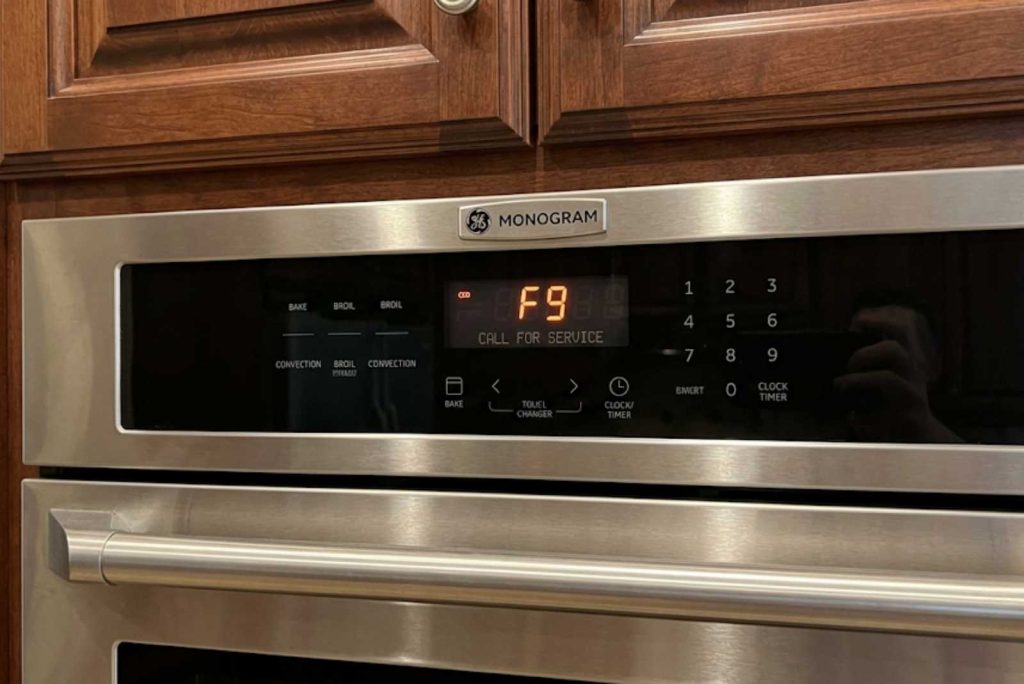
GE Monogram oven F-codes flag a specific fault: F0, F1, and F7 mean a stuck key or failed control board; F2 means dangerous overheating, so cut power; F3 and F4 are temperature-sensor faults; and F9 is a door-lock failure. Try a 5-minute power-cycle reset first, but most F-codes that return need a technician.
An F-code is your oven’s built-in diagnostic telling a technician exactly where to look, and a few of them you can clear yourself. This guide explains what each code means, which one is a genuine safety risk, and when a reset will work versus when you need service. GE Monogram Repair Expert services built-in GE Monogram wall ovens and ranges across California, Washington, and Massachusetts. If a code keeps returning after a reset, you can book a certified technician.
How GE Monogram oven F-codes work
The “F” stands for fault, and the number identifies the circuit. Older control boards use a simple code like F2 or F9, while newer boards add a subcode, shown as F2 E0 or F9 E0, that pinpoints the exact component.
One thing to know up front: codes are not identical across every model and control generation. The same F-number can point to slightly different parts on different boards, so the most reliable read is always your model number paired with its service manual. The table below covers the codes seen most often on Monogram ovens.
GE Monogram oven F-code reference
Use this as a starting point, then confirm against your model. A code that clears and stays gone was likely a glitch; a code that returns is a real fault.
| Code | What it means | What to do |
| F0, F1, F7 | Stuck or shorted key on the touchpad, or a failed electronic control board | Press Clear/OFF; if it returns, the keypad or board needs service |
| F2 (or F2 E0) | Over-temperature: oven hotter than set, often a stuck bake relay or a failed sensor | Safety issue: cancel the cycle and cut power, then call for service |
| F3 | Oven temperature sensor open, or open wiring to it | Sensor or wiring fault; needs service |
| F4 | Oven temperature sensor shorted, or shorted wiring | Sensor or wiring fault; needs service |
| F5, F8, FF | Electronic control board fault (F8 is a memory/EEPROM failure) | Reset once; if it returns, the board needs replacing |
| F9, FC (or F9 E0) | Door-lock circuit failure, common after a self-clean cycle | Door won’t lock or unlock; needs service |
| F7F | Glass-touch failure on touch-glass models | Glass-touch control needs replacing; service |
| F96, F97 | Convection or cooling fan running slow (upper or lower) | Wiring, obstruction, or fan motor; service |
| LOC | Control lock or child lockout is on (not a fault) | Hold the lock pad a few seconds to turn it off |
The code that’s a safety issue: F2
Most F-codes are an inconvenience; F2 is the one to treat seriously. It means the oven measured a temperature well above what you set, which is a burn and fire risk.
The usual cause is a bake relay on the control board that has welded shut, sending continuous voltage to the heating element, though a failed sensor can also trigger it. Cancel the cycle and shut the oven off at the breaker so it can cool, and do not keep cooking. This one needs a technician to confirm whether the board or the sensor is at fault before the oven goes back into use.
Stuck-key and control-board codes
F0, F1, and F7 point to the touchpad or the control board, and they often arrive with constant beeping from a key the oven thinks is held down. Moisture, grease, or a worn ribbon cable behind the panel is a common cause.
Press Clear/OFF first, since the code sometimes clears on its own. There is a clean diagnostic a technician uses here: with power off, the flat ribbon cable from the keypad is disconnected, then power is restored, and if the code returns in about 30 seconds the control board is at fault, while if it stays gone the keypad is the problem. F5, F8, and FF point straight to the control board itself.
Sensor and door-lock codes
F3 and F4 are temperature-sensor faults, and they are among the more affordable repairs. The sensor, a thin probe in the oven cavity, should read roughly 1,080 to 1,100 ohms at room temperature; a reading far outside that means it has failed, and an F3 or F4 often shows up as an oven that won’t heat correctly, covered in our oven not heating guide.
F9 and FC are door-lock failures, and they usually appear right after a self-clean cycle when the lock motor or switch sticks. Because the door may stay locked, this is a service call; forcing it risks damaging the latch. Both sensor and lock repairs go through a wall oven repair or range repair visit.
How to clear a code and when to call
Start with the simplest reset. Press Clear/OFF, and if the code persists, switch the oven off at the breaker for 5 minutes, then restore power; this clears a one-time glitch on many boards.
If the code returns within a few minutes, it is a real fault, not a glitch, and resetting again won’t change that. GE Monogram Repair Expert works from a diagnostic-first written quote, so you see the failed part and the price before any repair begins, and certified technicians fit genuine OEM parts. A sensor is a modest fix, while a control board is pricier, so for the bigger repairs weigh it with our repair-or-replace guide. If the codes are on an induction range, our induction cooktop guide covers the cooktop side.
Frequently asked questions
What does F2 mean on a GE Monogram oven?
F2 means the oven detected a temperature well above the setting, a genuine safety risk. The usual cause is a stuck bake relay on the control board feeding constant power to the element, or a failed sensor. Cancel the cycle, cut power at the breaker to let it cool, and call a technician before using it again.
How do I clear an F-code on my GE Monogram oven?
Press the Clear/OFF pad first. If the code stays, switch the oven off at the breaker for 5 minutes, then restore power to clear a one-time glitch. If the same code returns within a few minutes, it is a real fault and needs a technician rather than another reset.
What does F3 mean on a GE Monogram oven?
F3 is an oven temperature-sensor fault, usually an open sensor or open wiring to it. The sensor should read about 1,080 to 1,100 ohms at room temperature, and a failed one often shows as an oven that won’t heat properly. It is a relatively affordable repair done by a technician.
Why does my GE Monogram oven keep beeping with an F7?
An F7 means the control board reads a key as stuck down, which triggers constant beeping. Moisture, grease, or a worn ribbon cable behind the panel is the usual cause. Press Clear/OFF first; if the beeping and code return, the keypad or control board needs service.
Are GE Monogram oven error codes the same on every model?
No. The same F-number can mean slightly different things across control generations, and newer boards add a subcode like F2 E0 that older ones don’t. Always confirm with your model number and its service manual, and use any general code list as a starting point rather than the final word.
Read the code, then decide
An F-code tells you whether you are looking at a quick reset, an affordable sensor swap, or a control-board repair, and F2 tells you to stop and cut power. Match the code to the table, try one reset, and you’ll know which way it’s headed.
If the code returns or the oven won’t run safely, book a diagnostic visit with a certified GE Monogram technician and get a written quote before any work begins.